
Getting to know the interface
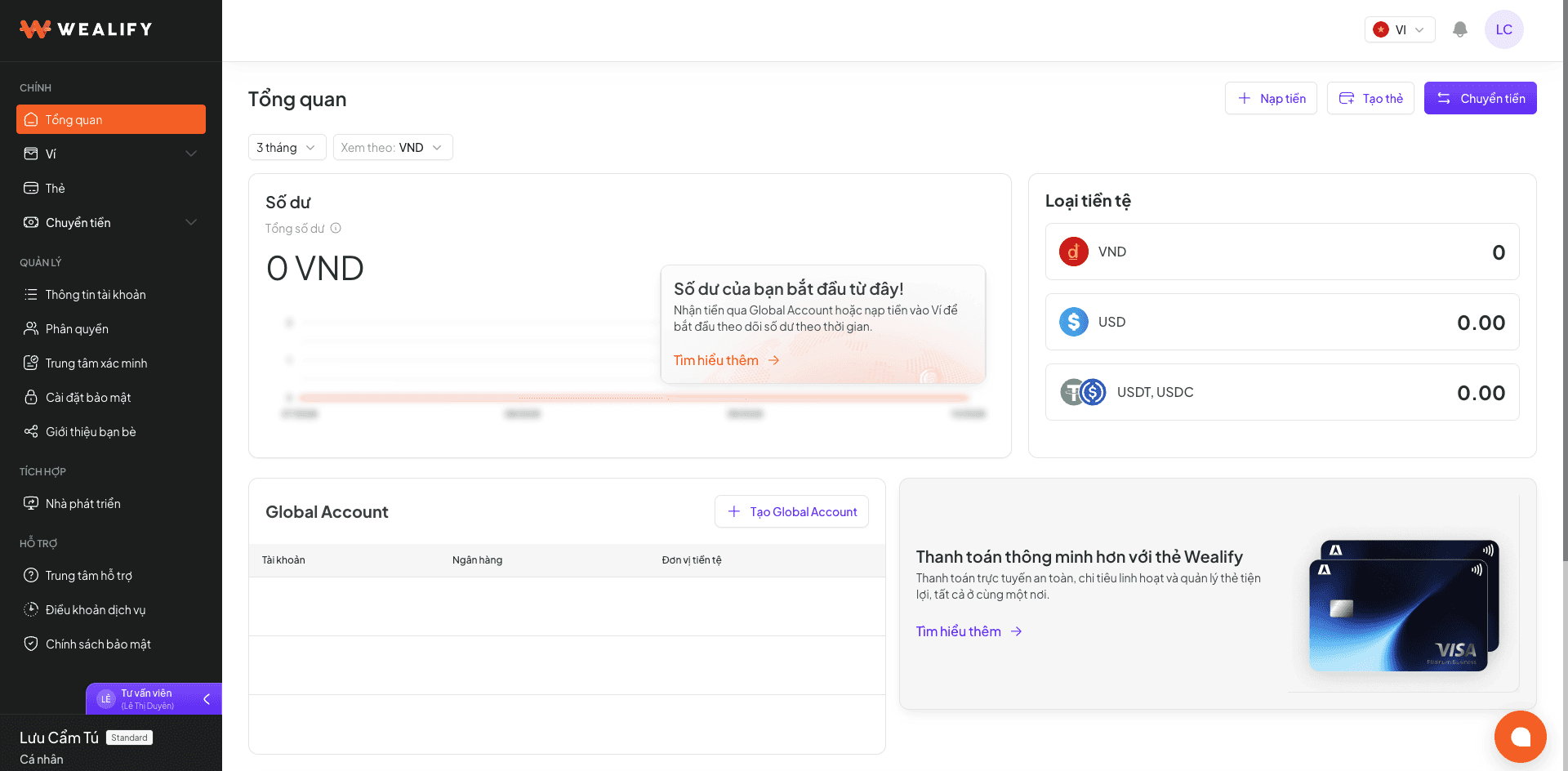
Location | Element | Content and function |
|---|---|---|
Overview screen | Top up · Create card · Transfer (three buttons at the top right) | Shortcuts to the three most-used actions, without going through the menu |
Balance | Total assets converted to one currency (chosen in View in), with a chart of changes over 7 days or another period | |
Currencies | The actual balance of each section — VND, USD, USDT / USDC — not converted. This differs from the Balance box (converted) — it's normal for the two numbers not to match | |
Recent transactions | The 5 latest transactions, with the product (Global Account, Card…) and amount. Choose View all for the full history | |
Global Account | The 3 newest receiving accounts. Choose View all or Create Global Account | |
Cards | Your cards, card balance, total top-ups, total spending. Choose View all or Create card | |
Money in and money out | A chart comparing money in / out by month and two pie charts of the share by currency, for tracking your cash flow | |
Left menu — Main | Overview | The summary screen described above |
Wallet → Global Account, Stablecoin wallet | Balances by currency, VND / USD receiving accounts, USDT / USDC receiving addresses. Global Account doesn't have its own menu item — go to Wallet → Global Account | |
Cards | Card list, create cards, card transactions | |
Transfer → Recipients | Create outgoing transfer orders and manage your recipient list | |
Left menu — Management | Account information | Tier, email, full name, phone number, password |
Permissions | Invite staff, assign roles | |
Verification Center | KYC / KYB applications / additional documents | |
Security settings | Two-factor authentication | |
Refer friends | Referral link and code | |
Left menu — Integrations | Developers | API key, webhook |
Left menu — Support | Help Center · Terms of Service · Privacy Policy | Opens the help pages and legal documents in a new tab |
Bottom of the menu | User information | Your name, account type (Personal / Business) and current tier |
Top bar | Language (VI / EN) | Changes all text on the screen instantly. Emails and notifications are also sent in the language you choose |
Notification bell | The number on the bell is how many notifications you haven't read. They include verification results, incoming money, completed or failed transfers, card creation and fees charged. Notifications are kept for 1 year | |
Avatar | Quickly opens Account information and Log out |